
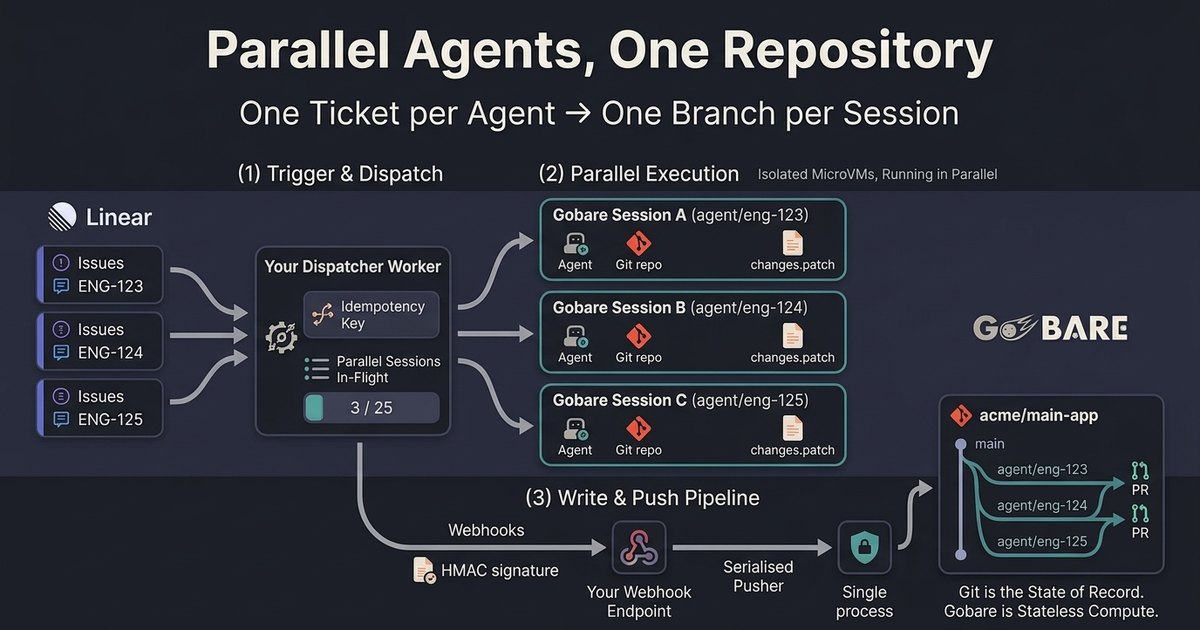
This guide demonstrates an architectural pattern built on Gobare's API (where I work). The core pattern (one agent per ticket, one branch per session, and a single-writer push worker) is runtime-agnostic and applies to any infrastructure that provides isolated execution environments.
When scaling automated software engineering, teams inevitably hit the same multi-agent concurrency wall: ten tickets land in Linear, ten agents spawn in parallel, and all ten attempt to modify the same repository.
The engineering challenges that follow are always identical: How do you trigger agents without holding open long-lived HTTP streams? How do you reliably capture completion signals? And how do you prevent two concurrent agents from stepping on each other's git commits?
This guide details the architecture that solves all three.
The core philosophy relies on strict separation of concerns: Linear holds the intent, Git holds the truth, and Gobare provides the ephemeral compute.
Five architectural invariants
- One ticket, one session, one branch. The session isolates compute; the Git branch isolates state changes. Two active sessions must never share a branch.
- Compute is ephemeral; state lives in Git. An agent needs only two things to start: the ticket context and a clean repository checkout. Once the patch is extracted, destroy the session.
- Asynchronous event loops over open connections. Never hold HTTP/SSE streams open for long-running agents. Fire requests asynchronously, return immediately, and handle state transitions via signed webhooks.
- Idempotency at every boundary.
Linear re-delivers triggers. Webhooks deliver at-least-once and may arrive out of order. Every write operation must carry an
Idempotency-Key, and every event handler must be safe to execute multiple times. - Design around hard infrastructure bounds. Respect limits at the orchestration layer: 10 session creations per minute per token, 25 concurrent sessions per organization (paused sessions count until you delete them), and a 2-hour hard wall-clock lifetime per sandbox. Your dispatcher must manage these limits explicitly.
The architecture
  Linear                          Your dispatcher                       Gobare
  ──────                          ───────────────                       ──────
  Issue → "Ready for agent"  ──▶  webhook handler
                                    │ dedupe: issue_id + state transition
                                    │ enqueue task
                                    ▼
                                  worker
                                    │ checks: in-flight < 25 | creates < 10/min
                                    │
                                    ├─▶ POST /v1/sessions (+ opening input) ─▶ Session A (agent/eng-123)
                                    ├─▶ POST /v1/sessions (+ opening input) ─▶ Session B (agent/eng-124)
                                    └─▶ POST /v1/sessions (+ opening input) ─▶ Session C (agent/eng-125)
                                    │                                          (isolated machines)
                                    ▼
                                  returns immediately

  Gobare ──▶ your webhook endpoint  (acknowledge within 10 s, process async)
              │ verify HMAC-SHA256 signature on the raw body; dedupe the event
              │
              ├─▶ turn.completed          → fetch patch, apply locally, push branch,
              │                             open PR, update ticket, delete session
              │
              ├─▶ turn.failed             → post the error on the ticket; schedule a retry
              │
              └─▶ session.action_required → handle tool approval / human-in-the-loop
Notice that neither Gobare nor the dispatcher is the source of truth. Linear tracks what was requested; Git records what was changed. The runtime is an execution pipeline.
One-time environment setup
1. Authenticate GitHub and model credentials
GitHub integration is managed in the Console (Settings → App integrations). Model keys are stored at the organization level, verified on save, and are never injected into the sandbox environment:
export GOBARE_API="https://api.gobare.dev"
export GOBARE_TOKEN="gbr_pat_..."   # Scopes: sessions:read + sessions:write

curl -s -X POST "$GOBARE_API/v1/model-credentials" \
  -H "Authorization: Bearer $GOBARE_TOKEN" \
  -H "Content-Type: application/json" \
  -d '{"key": "sk-ant-api03-..."}'
2. Register the agent definition
Define your fleet's instructions once. Updating agent behavior across the entire fleet then takes one API call rather than a redeploy:
AGENT_ID=$(curl -s -X POST "$GOBARE_API/v1/agents" \
  -H "Authorization: Bearer $GOBARE_TOKEN" \
  -H "Content-Type: application/json" \
  -d '{
    "name": "ticket-worker",
    "model": "claude-sonnet-4-6",
    "approval_mode": "auto",
    "instructions": "You implement one ticket per session.\nWork exclusively on the branch named in the prompt; create it from the default branch. Never modify other branches.\nRun the test suite before completing your work.\nUpon completion: git add -A && git commit -m \"<TICKET-ID>: <summary>\" && git format-patch origin/HEAD --stdout > /workspace/outputs/changes.patch\nProvide a concise PR summary at the end.\nIf the ticket is ambiguous, do not guess: commit current progress, output the patch, and end your final turn message with \"QUESTION: <your question>\".",
    "text": {"verbosity": "medium"}
  }' | jq -r .id)
Note:
approval_mode: autosuits automated pipelines because the downstream pull request serves as the human approval gate.
3. Subscribe to webhook events
curl -s -X POST "$GOBARE_API/v1/webhooks" \
  -H "Authorization: Bearer $GOBARE_TOKEN" \
  -H "Content-Type: application/json" \
  -d '{
    "url": "https://your-backend.example/gobare/events",
    "events": ["turn.completed", "turn.failed", "session.action_required"]
  }'
- Security: The signing secret is returned only once. Signatures are
HMAC-SHA256(secret, "{timestamp}.{raw_body}"), hex, inx-gobare-signature. Always verify against the raw bytes rather than a re-serialized JSON object, and treatx-gobare-timestampas milliseconds. - Delivery guarantees: A delivery is attempted up to six times over roughly nine hours, then marked dead. Always return
2xxwithin 10 seconds and offload heavy processing to an asynchronous queue.
Per-ticket execution lifecycle
1. Dispatching work
When an issue transitions to "Ready for agent", your Linear webhook handler enqueues the job and responds immediately.
The worker checks in-flight sessions (GET /v1/sessions?created_by_token=me) to stay under the 25 concurrent session cap and the 10 creations per minute limit.
2. Session initialization and dispatch
Send the ticket context and create the session in a single atomic call:
curl -s -X POST "$GOBARE_API/v1/sessions" \
  -H "Authorization: Bearer $GOBARE_TOKEN" \
  -H "Content-Type: application/json" \
  -H "Idempotency-Key: ticket-$LINEAR_ISSUE_ID" \
  -d '{
    "agent": {"id": "'"$AGENT_ID"'"},
    "environment": {"repo": "acme/main-app"},
    "title": "ENG-123",
    "metadata": {
      "linear_issue": "ENG-123",
      "branch": "agent/eng-123"
    },
    "input": "Linear Issue ENG-123\nBranch: agent/eng-123\n\nTitle: Fix race condition in payment webhook\n\nAcceptance Criteria: ..."
  }'
- Metadata routing:
metadatapasses through untouched and is queryable. Your webhook handlers can route incoming events back to the issue viaGET /v1/sessions?metadata=linear_issue:ENG-123.
3. The single-writer push pipeline
To protect your codebase, sandboxes should never hold write tokens to your repository.
Instead, the agent generates a patch file at /workspace/outputs/changes.patch. On turn.completed, your background worker fetches the artifact, applies it locally, and pushes the branch:
# Fetch and apply the patch inside your trusted worker
curl -s "$GOBARE_API/v1/sessions/$SESSION_ID/artifacts/archive?turn_id=$TURN_ID" \
  -H "Authorization: Bearer $ARTIFACTS_TOKEN" | tar -x -C ./out

git fetch origin main
git checkout -B agent/eng-123 origin/main
git am ./out/changes.patch
git push -u origin agent/eng-123
This design enforces two guarantees:
- Model-driven code never holds push privileges to Git.
- Every repository write flows through a single, serialized pipeline, eliminating push races.
Event handling patterns
turn.completed
- Extract
metadata.linear_issueandmetadata.branch. - Retrieve the turn's artifacts. If the final message starts with
QUESTION:, post the question to Linear and set the status to "Needs input". - Otherwise, apply the patch, push the branch, open a pull request, move the Linear issue to "In review", and delete the session (
DELETE /v1/sessions/$SESSION_ID). Deleting the session immediately frees one of your 25 concurrent slots.
turn.failed
Post the error to the ticket. If the failure is recoverable (for example, a test failure), start a fresh session on the same branch with the error context. Check environment.repo.clone_error first: a failed clone is the one failure that isn't the agent's.
Human-in-the-loop interrupts
If an agent needs clarification, do not leave the session waiting mid-turn for hours: the 2-hour wall-clock limit keeps running while it waits, and a turn still waiting when it is reached is interrupted.
Have the agent finish its turn with the question after writing a checkpoint patch. When a human responds in Linear, send the answer as a new message, to the same session or to a fresh one:
curl -s -X POST "$GOBARE_API/v1/sessions/$SESSION_ID/events" \
  -H "Authorization: Bearer $GOBARE_TOKEN" \
  -H "Content-Type: application/json" \
  -H "Idempotency-Key: reply-$LINEAR_COMMENT_ID" \
  -d '{
    "events": [
      {
        "type": "input.message",
        "content": "Use the existing PaymentsClient; do not introduce a new HTTP dependency."
      }
    ]
  }'
Eliminating write races
"How do you handle multiple agent instances racing on git writes?"
The runtime should not handle git write races. Git already excels at this when structured correctly:
- Branch isolation: Each ticket operates on a dedicated branch (
agent/eng-xyz). Ref writes never collide. - Single-writer push: All git push operations originate from a single, serialized queue in your backend worker.
- Merge-time conflict resolution: Code conflicts surface where they belong: in pull requests, evaluated by merge queues or human reviewers.
- Planning-layer overlaps: If two tickets touch the same modules, handle it at the dispatcher by checking active session metadata before starting a new ticket.
Idempotency reference
| Endpoint / boundary | Key | Failure prevented |
|---|---|---|
POST /v1/sessions |
ticket-{linear_issue_id} |
Duplicate Linear webhooks spawning duplicate sessions and competing branches |
POST /v1/sessions/{id}/events |
reply-{linear_comment_id} |
Comment retries sending duplicate instructions to an agent |
| Your webhook handler | {event_type}:{session_id}:{created_at} |
Re-processing duplicate or out-of-order webhook deliveries |
| PR creation | pr-{branch_name} |
Duplicate pull requests on worker retries |
Token scope strategy
Follow the principle of least privilege across your services:
| Service / role | Required scopes | Capabilities |
|---|---|---|
| Dispatcher service | sessions:read, sessions:write |
Create and delete sessions, send messages and answers, manage webhooks |
| Function/tool handlers | sessions:read, tools:respond |
Answer function calls only (cannot delete sessions or post messages) |
| Artifact downloader | artifacts:read |
Read and download patch artifacts |
Summary
By decoupling execution sandboxes from long-term repository state, you can scale parallel coding agents reliably.
Start building with the Gobare quickstart, inspect the full OpenAPI specification, or read the guide to webhooks.